Experiment · 2025
Lumaire
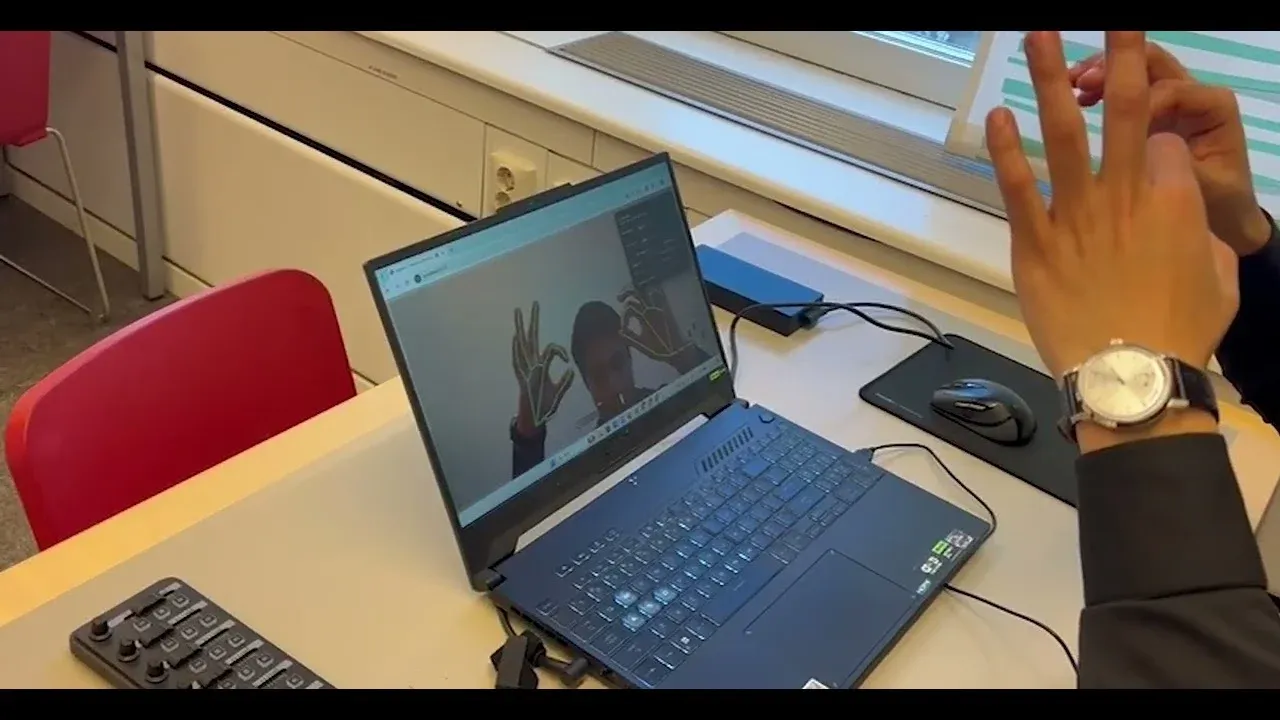
A DJ controller with no controller. Two decks, a crossfader and EQ, played with your bare hands through a webcam, right in the browser.
- Role
- Lead developer & interaction designer
- Timeline
- 7 weeks (Nov 2025 – Jan 2026)
- Team
- Team of 4
- Client
- KTH Royal Institute of Technology (course project)
- JavaScript
- MediaPipe Hands
- Tone.js
- Web Audio
- Canvas 2D
- Vite
The question
What if your body was the instrument?
Mixing music is a physical act: you lean into a fader, you feel for the beat. But before you get to do any of that, there’s a box of knobs between you and the sound, and you have to buy it and learn it first.
Lumaire started as our project for DT2140 Multimodal Interaction and Interfaces at KTH. We wanted to find out whether a laptop webcam could do a controller’s job well enough to mix with. No install, no hardware: just a browser tab and your hands.
A gesture vocabulary
The first design problem wasn’t technical. It was deciding what each gesture should mean. Every gesture had to pass three tests:
- The camera can tell it apart from every other gesture, at a normal distance, in ordinary room light.
- You can hold it while you move, because most DJ controls are slides, not button presses.
- It means the same thing on either hand, so learning it once is enough.
We kept the vocabulary small: three hand shapes and one two-handed gesture.
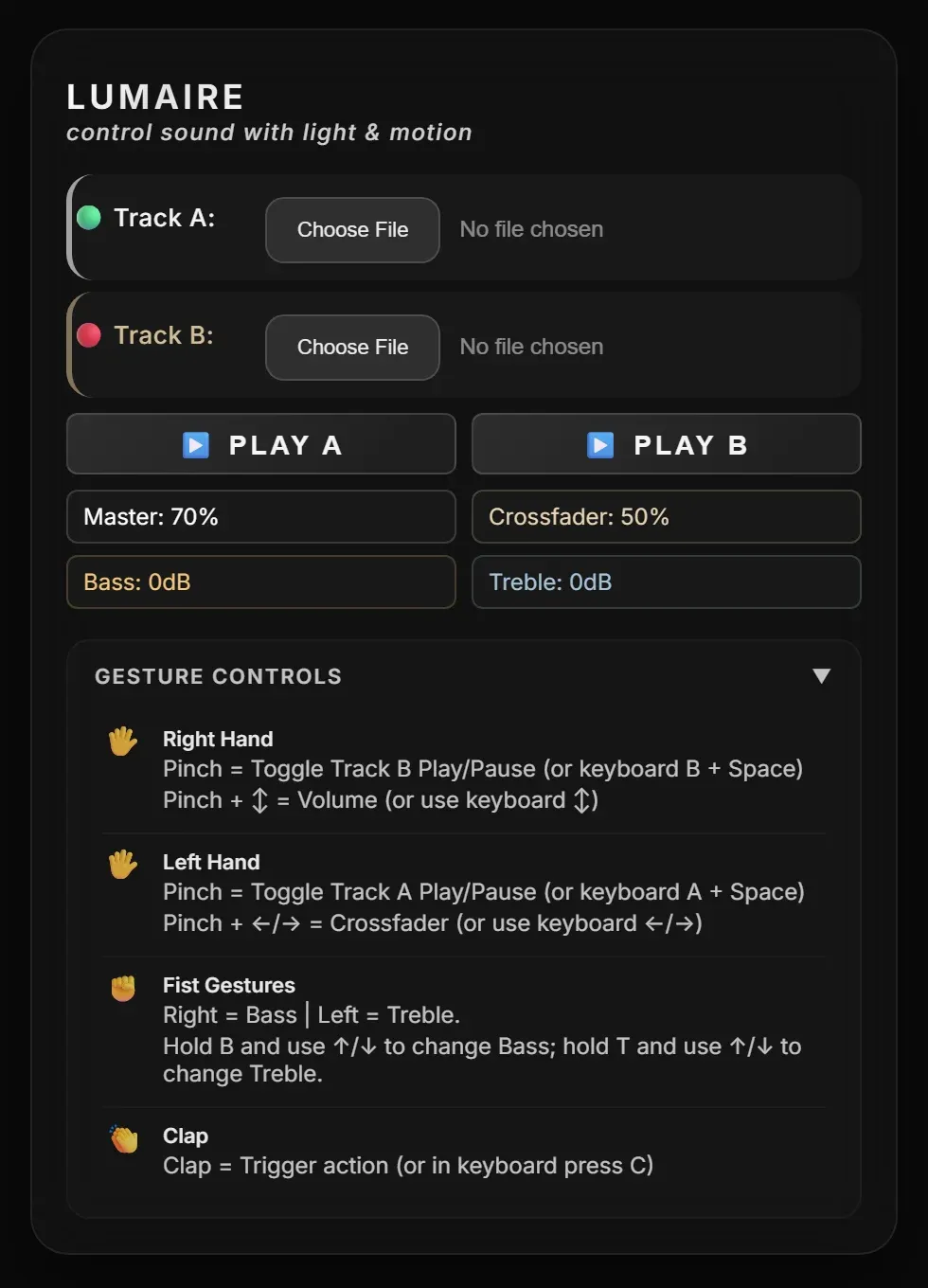
| Gesture | Left hand (Track A) | Right hand (Track B) |
|---|---|---|
| Quick pinch | Play / pause Track A | Play / pause Track B |
| Pinch and drag | Crossfader, left ↔ right | Master volume, up ↕ down |
| Fist and move | Treble, up ↕ down | Bass, up ↕ down |
| Clap (both hands) | Match tempo and line up the beats |
Key design decisions
The gestures were easy to list. Making them feel reliable is where most of the seven weeks went.
1. A tap and a drag start the same way
A pinch both plays a track and grabs a slider, and at the moment your fingers touch, there’s no way to know which one you mean. So Lumaire decides on release. If your hand barely moved while pinched (under 1% of the frame), it was a tap, and the track plays or pauses. If it moved further, it was a drag, and letting go does nothing.
Drags are also relative. Pinching captures the current value, and moving your hand changes it from there. That’s how a physical fader works: you grab it where it is, and the volume never jumps just because your hand was in a different spot.
2. A fist beats a pinch
As a hand closes into a fist, it briefly passes through a pinch shape. Left alone, every bass adjustment would have started with a stray play/pause. So a fist always takes priority: it cancels any pinch in progress, and a pinch only counts on an open hand.
To tell open from closed, Lumaire looks at each finger. If the fingertip is closer to the wrist than its middle joint, the finger is curled, and three curled fingers out of four make a fist. It’s simple, and it holds up whichever way your hand is turned.
3. Thresholds are design decisions
Most of the feel of Lumaire comes down to a handful of numbers, and we found them by trying it on each other and adjusting:
- Pinch: thumb and index tip within 3% of the frame, so the fingers have to really touch. A looser pinch fired by accident whenever someone was just talking with their hands.
- Crossfader: we shortened the full sweep twice. It ended up at a tenth of the frame’s width, so you can blend from Track A to Track B without stretching across the camera.
- Sliders: volume and EQ each have their own sensitivity, so a comfortable wrist movement covers the full range.
4. Making the clap work
The clap went through our history as “Clap working but fails sometimes.” The cause turned out to be the camera itself. Right when two hands meet, one blocks the other, and the hand tracker tends to lose a hand at the exact moment that matters most.
So the clap detector remembers where each palm was for 400 ms and keeps measuring with that if a hand disappears. A clap only counts if the hands are close together and approaching fast, so resting your hands together doesn’t trigger it. After that, there’s a short cooldown.
What a clap does is the most ambitious part of the build:
- 01Estimate tempo
When a track loads, Lumaire estimates its BPM from the rhythm of its loudness, in the background.
- 02Match tempo
Track B speeds up or slows down to match Track A, by at most 10% so it doesn't sound warped. Its pitch is shifted back so the key stays the same.
- 03Line up the beats
Track B jumps to the nearest point where its beats land on Track A's, with an 80 ms fade to hide the jump.
5. Feedback replaces touch
Without a physical fader, your hand doesn’t know what it’s holding, so the screen has to tell you. The camera view is mirrored so your left hand appears on the left (which also means swapping the tracker’s hand labels). It’s overlaid with:
- a skeleton on each hand, labelled with what that hand is controlling right now (Crossfader, Bass (Fist)…);
- live readouts for volume, crossfader position, bass and treble;
- audio waves around the edges of the screen, driven by the music, so the screen reacts the moment a track starts.
The control panel
Load two tracks, then mix. The panel shows every value as you change it, and it keeps a cheat sheet of every gesture one click away, so first-time users never have to remember the vocabulary.
6. Every gesture has a fallback
Every gesture also works from the keyboard: hold A or B and press Space to play a deck, use the arrows for volume and the crossfader, and hold B or T with the arrows for bass and treble. You can also click the readouts to adjust them.
How it’s built
Lumaire runs entirely in the browser. It’s built from four small modules that only talk to each other through a shared state store, so the hand tracking, the sound and the visuals never need to know about one another.
- 01Gesture engine
MediaPipe Hands tracks 21 points on each hand. The engine turns them into pinches, fists and claps, and into control changes.
- 02State store
One source of truth for volume, crossfader, EQ and playback. Everything else subscribes to it.
- 03Audio engine
Tone.js on the Web Audio clock: two players, each with pitch correction, running through a treble filter, a bass filter and an analyser.
- 04Visual engine
Canvas 2D: the mirrored camera feed, hand skeletons, readouts and the audio-reactive edges.
- installs, plugins or hardware: it runs in a browser tab
- 0
- tracked points per hand, on both hands at once
- 21
- gestures controlling 8 actions, each with a keyboard fallback
- 4
My role
I started Lumaire and built its foundation:
- the hand tracking pipeline and the gesture and state architecture the rest of the project is built on;
- play/pause, master volume, and bass and treble on fist gestures;
- the audio-reactive visualiser and the on-screen interface;
- tuning the pinch so it fires when you mean it and not when you don’t;
- the hidden easter egg (raise the wrong finger at it and it answers back).
My teammates built the crossfader and its tuning, the clap tempo-matching and beat alignment, and the keyboard controls, and prototyped a 3D view that we left out of the final build. I also looked after the repository and reviewed and merged the team’s pull requests. After the course, I cleaned up the code, rewrote the documentation and published Lumaire on GitHub Pages so anyone can try it.
Reflection
What I learned
- Commit on release. When one gesture can mean two things, wait for the moment it ends before deciding which.
- Design for missing data. The camera loses sight of your hands exactly when they’re doing the most interesting thing. Plan for gaps from the start.
- Thresholds are UX. Most of the difference between frustrating and natural came from tuning a few numbers.
- The fallback is part of the design. A gesture interface that only works with gestures leaves people out.
What I’d do next
- 01Calibration
A short warm-up that measures your hand size and distance from the camera, so the thresholds fit you, not the average.
- 02Onboarding
Teach the four gestures one at a time, with live feedback, instead of a cheat sheet.
- 03Formal testing
Measure latency and how often taps are mistaken for drags, with people who have never touched a DJ controller.
- 04Two-hand controls
Use the distance between your hands for tempo and their angle for filter sweeps: gestures only a body can make.